
According to Statista, global retail e-commerce sales are projected to exceed US$8 trillion in 2028! (Source: Statista)
As businesses compete for customers across borders, simply making a website accessible is no longer enough. Visitors expect experiences that feel familiar from the moment they land on your website.
A customer in Japan may expect different navigation patterns than someone in the UK. A buyer in Germany may look for different payment methods – while visitors in the Middle East may expect culturally relevant messaging and right-to-left support where applicable. These expectations go far beyond language.
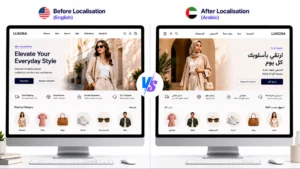
This is why more businesses are learning how to localise your website for international audiences instead of simply translating web pages. A multilingual website can help users understand your content – but only proper website localisation makes it feel relevant, trustworthy and easy to engage with.
In this guide, we will explore what website localisation really means and how it differs from translation. We will also find out why it matters for international growth alongside the practical steps you can take to build a multilingual website – delivering a local experience in every market.
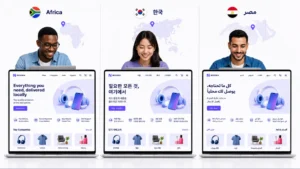
Website localisation is the process of adapting your website. This is done to meet the language, cultural, technical and commercial expectations of users in different regions.
Many businesses assume localisation simply means – translating website copy into another language. In reality – translation is only one part of the process.
A properly localised website adapts the complete digital experience, including:
The objective isn’t simply helping visitors understand your website.
It’s helping them feel that your website was designed specifically for them.
For example, imagine an online insurance provider entering Japan.
Translating product pages into Japanese isn’t enough. The business may also need to:
Every one of these changes contributes to a better customer experience.
That’s why website localisation should be viewed as a business strategy – rather than a content project.
Businesses often underestimate how quickly poor localisation affects credibility.
Some common examples include:
Each issue may seem minor on its own.
Together, they create an experience that feels unfamiliar – reducing trust long before a visitor reaches the checkout page.
As businesses expand digitally – websites often become the first interaction international customers have with a brand.
Researches show that companies investing in localisation outperform competitors in international markets. This is because customers naturally engage more with content that feels local and culturally familiar. (Source: Nimdzi)
Website localisation impacts far more than readability.
It directly influences:
Consumers naturally feel more confident when they can browse products, compare pricing and complete purchases – all in their preferred language.
This isn’t simply about convenience.
It reduces uncertainty throughout the buying journey.
For businesses investing in international growth, website localisation becomes one of the fastest ways to reduce friction throughout the customer journey.
International growth depends on visibility as much as user experience. Search engines don’t simply translate English pages for overseas users. They prioritise content specifically created or adapted for regional audiences.
A strong website localisation strategy supports:
Without these foundations, even high-quality websites often struggle to perform internationally.
Customers rarely judge a website on language alone. They evaluate the overall experience.
If product descriptions, imagery, payment methods, terminology and customer journeys all feel relevant – users are far more likely to trust the business behind them.
This is why many global brands invest heavily in localisation – despite already operating in English. They are not simply translating websites. They are building familiarity.
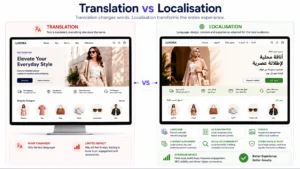
Many businesses use these terms interchangeably. They shouldn’t.
While website translation and localisation are closely related – they solve different problems. Translation focuses on converting words. However, localisation focuses on adapting experiences.
| Website Translation | Website Localisation |
| Converts text into another language | Adapts the entire user experience |
| Focuses on linguistic accuracy | Focuses on business outcomes |
| Treats pages independently | Considers the complete customer journey |
| Preserves wording | Preserves meaning, tone and intent |
| Limited cultural adaptation | Deep cultural adaptation |
| Doesn’t automatically improve SEO | Supports multilingual SEO and regional discoverability |
Consider a simple CTA: an English website might use: <<Start Your Free Trial Today>>
A direct translation may be technically correct. However, audiences in another market may respond better to messaging that emphasises consultation, trust, or product guidance – all this before committing.
Similarly, imagery that resonates in Europe may feel completely disconnected in Southeast Asia. Localisation ensures these details evolve alongside the language. It also extends beyond customer-facing content.
Businesses often need to adapt:
Ignoring these elements creates unnecessary friction – even if the translation itself is accurate.
Understanding the distinction between website localisation vs website translation is often the first step towards building an international website – genuinely performing across markets.
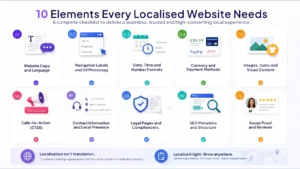
A successful localisation project goes far beyond translating headlines and product descriptions. Every touchpoint on your website shapes how users perceive your brand.
If you are wondering how to localise website content for global markets – use the checklist below as a starting point.
Your copy should sound natural to local audiences – not like it has been converted word for word.
That means adapting:
For example, an Australian audience may respond well to conversational language – while a German audience may expect a more direct and informative tone. The message remains the same, but the delivery changes.
Navigation is often overlooked during website localisation – yet it directly affects usability.
Buttons, menus and small interface elements such as:
should feel intuitive for local users. Even slight wording differences can improve navigation and reduce friction.
Different regions interpret information differently.
For example:
These details seem small – but they have a significant impact on user confidence.
Displaying prices in the wrong currency creates hesitation almost instantly. A truly multilingual website should also support:
For instance, customers in the Netherlands may expect iDEAL – while users in Germany often prefer PayPal or bank transfers.
Visuals communicate just as much as words. Review whether your website uses:
Let’s face it: a promotional banner featuring winter imagery may not resonate with audiences experiencing summer during the same campaign period.
What motivates users differs across markets. A CTA such as “Buy Now” may perform well in one region – while another audience may respond better to “Speak to an Expert” or “Request a Demo.”
Localising conversion messaging helps improve – both engagement and conversion rates.
International visitors look for reassurance that your business can support them. Where possible, localise:
These additions help build trust, especially for first-time visitors.
Every market has different legal requirements. Depending on the region, you may need to adapt:
Ignoring compliance can affect both customer trust and legal obligations.
Many businesses translate page content but forget about search optimisation. A strong website localisation strategy should also include:
Without these elements, your localised pages may never reach the audiences they were created for.
Testimonials should feel relevant to each market. Instead of showing only UK customer reviews to visitors in Singapore, consider including:
People naturally trust experiences that feel closer to their own.
A successful website localisation strategy doesn’t begin with translation software. Instead – it begins with understanding your customers and building a repeatable process.
Here’s a practical framework businesses can follow.
Start by identifying where the biggest opportunities exist. Look at:
Rather than launching ten languages at once – make sure to prioritise two or three high-potential markets first.
Before you start localising website content – review what already exists. Ask questions such as:
This helps prioritise effort and avoid unnecessary work.
Here’s a fact: not every page requires the same level of localisation. Start with:
Later, expand into blogs, resources and knowledge centres. A phased approach is often more sustainable – rather than trying to localise everything at once.
Technology determines how scalable your localisation process becomes.
Traditional translation workflows often rely on – spreadsheets, email chains and manual publishing. Modern AI website localisation platforms automate much of this process – while preserving context, terminology and brand consistency.
Choose tools that support:
Once your framework is ready, begin adapting the complete user experience – not just the text. Review:
Every interaction should feel natural – especially for the target audience.
International visibility depends on more than translated pages. Your international website optimisation strategy should include:
These elements help search engines understand which content should appear for different audiences.
Before launching, validate your work. Invite native speakers or local teams to review:
Small improvements at this stage can significantly improve conversion rates later.
Website localisation isn’t a one-off project. Every product update, pricing change or campaign – should flow into every language version.
Building ongoing review and QA workflows ensures your multilingual website stays consistent – across all markets.
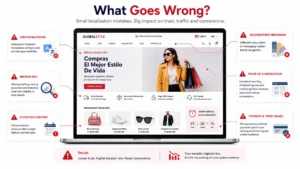
Even businesses with strong international ambitions often make avoidable mistakes. Here are some of the most common ones.
Machine translation can speed up workflows. However, publishing raw translations without review often creates awkward messaging. Make sure to review high-impact content before it goes live.
Some businesses translate every word while leaving navigation, forms and checkout experiences unchanged. Users don’t judge content separately from usability – they experience everything together.
Many organisations invest heavily in translation but neglect search visibility. Without proper regional keyword research, hreflang tags and metadata, localised pages struggle to attract organic traffic.
A single image library rarely resonates across every market. Review whether photography, colours and promotional materials feel appropriate for each audience.
Languages such as Arabic and Hebrew require right-to-left layouts. Simply translating the text isn’t enough. The entire interface often needs adapting.
As more languages are added, terminology can quickly become inconsistent. A product feature described one way in English shouldn’t suddenly appear under different names across markets. Maintaining a localisation glossary helps preserve consistency.
One of the biggest long-term challenges is maintenance. When the original website changes but translated versions don’t, customers receive outdated information. A scalable website localisation strategy includes continuous synchronisation – not just the initial launch.
Businesses today manage far more content than they did even five years ago.
Landing pages, product catalogues, blogs, support centres and campaign pages – all need regular updates. Maintaining every language manually is no longer practical.
This is where AI website localisation is changing the way organisations expand globally.
Modern AI can process large volumes of website content far faster than traditional workflows. It helps businesses launch into new markets sooner – keeping multilingual websites updated and reducing operational effort.
However, not all AI works in the same way.
Basic machine translation often converts sentences individually – without understanding how an entire page fits together.
Context-aware AI takes a broader view. It considers relationships between headings, CTAs, navigation, product information and surrounding content before adapting the language.
That difference becomes especially important for businesses that want to preserve:
The strongest localisation workflows don’t replace human expertise – they enhance it.
AI handles speed, scale and consistency – while people provide cultural judgement and strategic oversight.
For businesses planning international growth – that combination offers the most effective way to build a multilingual website that feels genuinely local. All this is done without dramatically increasing operational complexity.
By this stage, one thing becomes clear: successful website localisation is not just about translating content quickly. It is about preserving the experience your visitors expect in every market.
This is where emotii Website AI Studio is designed to help.
Instead of translating pages line by line, emotii analyses the entire website context before adapting it for each language. That means headlines, body copy, navigation, CTAs and supporting content – all continue to communicate the same intent, tone and brand personality – regardless of the language.
The platform is built specifically for businesses managing multilingual websites at scale. With support for 126+ languages – it helps organisations create localised website experiences. This is done without rebuilding pages or managing multiple versions manually.
Some of its key capabilities include:
Rather than replacing existing workflows, emotii fits naturally into them. Businesses can continue managing their websites as usual while the platform automatically delivers multilingual, context-aware experiences for every target market.
Whether you are launching your first multilingual website or expanding into additional markets – these best practices can help you build a stronger localisation strategy.
Don’t launch ten languages at once. Start with markets that offer the highest business potential based on traffic, customer demand and expansion goals.
Implement hreflang tags, research local keywords and optimise metadata – for every language version from the beginning.
Adjust imagery, tone, CTAs, layouts and payment options – to reflect local expectations.
Your messaging can sound local – while still feeling unmistakably like your brand.
Document preferred terminology, tone, spelling conventions and formatting rules to keep every language version consistent.
Even the best AI-powered workflows benefit from human validation for cultural nuances and regional expectations.
Whenever the original website changes, make sure every language version stays synchronised to avoid outdated or inconsistent experiences.
Track organic traffic, engagement, conversions and search visibility separately for each region. These insights help refine your website localisation strategy over time.
Website localisation is the process of adapting a website for different languages, cultures and regional preferences. It includes language, UX, SEO, imagery, currency, legal requirements and brand messaging.
Website translation converts text into another language. Website localisation adapts the entire digital experience so it feels natural for users in each market.
Start by identifying your target markets and auditing your website. Then go for localising content and UX – while implementing multilingual SEO. Lastly, test with native users and maintain ongoing updates.
Yes – a strong website localisation strategy improves multilingual SEO. This is done through localised keywords, hreflang implementation, region-specific metadata and better search relevance.
Yes, absolutely! Modern AI platforms can automate large parts of the localisation process – while preserving context, consistency and scalability. Context-aware solutions are generally far more effective than basic machine translation tools.
emotii Website AI Studio supports 126+ languages, enabling businesses to scale multilingual website experiences while protecting brand voice, SEO structure and contextual accuracy.
Businesses no longer compete only in their local markets. They compete wherever customers discover them. Learning how to localise your website for international audiences is therefore no longer optional – it’s a strategic investment in growth.
A successful localisation strategy goes beyond translating words. It adapts your content, user experience, SEO and brand communication – so every visitor feels like your website was built specifically for them.
Modern AI is making this process faster and far more scalable – but context remains the deciding factor. Businesses that combine intelligent automation with contextual localisation – will be far better positioned to build trust, improve conversions and grow internationally.
For organisations looking to simplify multilingual expansion – emotii Website AI Studio provides a practical way to deliver context-aware website localisation. This is done across multiple languages – while preserving brand voice, SEO performance and customer experience at scale.
Ready to make your website feel local in every market?
Discover how emotii Website AI Studio helps businesses create multilingual experiences that connect with global audiences – without adding operational complexity!